Cargors Shipper API
The Cargors Shipper API lets shippers book freight, request quotes, create RFQs, accept quotes, track shipments, and download labels.
Endpoint purpose cheat sheet
| Endpoint | Purpose | Creates RFQ? | Creates shipment? |
|---|---|---|---|
POST /shipments | Book immediately; Cargors picks the carrier | Yes (internal) | Yes |
POST /quotes | Get live quotes for a shipment payload (no RFQ saved) | No | No |
POST /accept-quote | Accept a live quote from /quotes using carrierId + full payload | Yes | Yes |
POST /rfqs | Save an open RFQ only (no shipment yet) | Yes | No |
GET /rfqs/{rfqId}/quotes | Read stored quotes for an existing RFQ (shipper prices only) | No | No |
POST /rfqs/{rfqId}/accept-quote | Accept a stored RFQ quote using quoteId only | Already exists | Yes |
GET /shipments | List your shipments | No | No |
GET /shipments/{shipmentId} | Get one shipment | No | No |
POST /shipments/{shipmentId}/label | Download shipment label | No | No |
Which accept endpoint should I use?
- Use
POST /accept-quotewhen you calledPOST /quotesfirst (Flow B). You must resend the full shipment payload pluscarrierId. - Use
POST /rfqs/{rfqId}/accept-quotewhen you calledPOST /rfqsfirst (Flow C). You only sendquoteIdfromGET /rfqs/{rfqId}/quotes.
Recommended integration flows
Flow A: Instant shipment (single-step)
When to use: You want Cargors to choose the carrier and create the shipment in one call.
- Call Create an instant shipment (
POST /shipments) with shipment details. - Cargors auto-selects the best carrier using routing, pricing, and operational rules.
- API returns shipment details and (when available) a shipment label URL.
Flow B: Quote-first (ephemeral quotes, then book)
When to use: You want to compare live prices before booking, without saving an RFQ first.
- Call Get quotes for provided shipment data (
POST /quotes). - Review returned quote options and pick one
carrierId. - Call Accept a quote and create shipment (
POST /accept-quote) with:- the same shipment payload used in
/quotes - selected
carrierIdfrom the/quotesresponse
- the same shipment payload used in
- API creates the RFQ internally, accepts the quote, and returns shipment details + label URL.
Flow C: RFQ-first (save RFQ, poll stored quotes, then book)
When to use: You want to persist an RFQ, retrieve stored quotes later, then accept with only a quoteId.
- Call Create an RFQ (
POST /rfqs) with the same shipment payload shape as/quotes. - API creates an open RFQ and returns
rfqId(no shipment is created). - Call Get quotes for an RFQ (
GET /rfqs/{rfqId}/quotes) to read stored shipper-facing quotes.- If quotes are not ready yet,
quotesis an empty array — poll again later.
- If quotes are not ready yet,
- Call Accept an RFQ quote and create shipment (
POST /rfqs/{rfqId}/accept-quote) with the selectedquoteId. - API accepts the stored quote and creates the shipment.
Quote responses always expose shipper prices only (totalPrice, transportPrice, etc.). Carrier-net fields (baseTotalPrice, adminCommission) are never returned.
Shipment follow-up APIs
- Get shipments list (
GET /shipments) — list shipments with optional date filters. - Get a shipment by ID (
GET /shipments/{shipmentId}) — status and details for one shipment. - Download a label for a shipment (
POST /shipments/{shipmentId}/label) — fetch label content.
Authentication is required for all shipper endpoints. Send your API key in x-api-key.
Shippers can generate keys in the Cargors Portal (Integrations → Cargors API) or via the key management API. See the Shipper API keys guide in the docs.
Assign bookings to a sub-shipper
Optionally send subShipperEmail, the existing sub-shipper's portal login email.
For POST /shipments, put it inside each item in shipments; items in a batch may have different owners.
For POST /quotes, POST /accept-quote, and POST /rfqs, put it at the top level of the shipment payload.
Quote requests only validate the identity; resend it when booking with POST /accept-quote.
For POST /rfqs/{rfqId}/accept-quote, omit it to inherit the RFQ's owner, or send it to assign the resulting shipment to that sub-shipper.
The email is trimmed and matched case-insensitively. It must belong to an existing active, unblocked sub-shipper of the account identified by your API key.
An unknown, removed, blocked, or other company's sub-shipper returns HTTP 400 with code badRequest; no booking is created for that request.
All sub-shipper identities in an instant-booking batch are checked before any RFQ or shipment is created. Development keys perform the same identity checks.
Omitting subShipperEmail, or sending null, an empty string, or whitespace, preserves normal parent-shipper booking behavior (an existing RFQ's owner is retained when accepting its quote).
The parent account continues to own billing, pricing, and the API key. The linked sub-shipper can find the resulting records in the portal according to their portal access rights.
This field assigns ownership; it does not sign in as that user or grant portal permissions.
Load Type Limits
Each typegoods value has defined maximum dimensions and weight limits per item. Ensure your loadInformation values stay within the limits for the selected type.
| Pallet Type | Max Weight (kg) | Max Height (cm) | Max Width (cm) | Max Length (cm) |
|---|---|---|---|---|
| Euro pallets | 1000 | 300 | 80 | 120 |
| Mini pallets | 800 | 300 | 60 | 80 |
| Cheppallets | 800 | 300 | 80 | 120 |
| Block pallets | 1000 | 300 | 100 | 120 |
| Plastic Block pallets | 1000 | 300 | 100 | 120 |
| Plastic Euro pallets | 800 | 300 | 80 | 120 |
| Disposable Euro pallets | 800 | 300 | 80 | 120 |
| Boxes | 800 | 300 | 80 | 120 |
| Full truck | 24000 | 300 | 1320 | 240 |
| Combi | 24000 | 300 | 1520 | 240 |
| Others | 24000 | 300 | 240 | 1000 |
Others — custom configuration: When
typegoodsis set toOthers, you may specify fully custom dimensions and weight up to the limits shown above. Use theotherfield inloadInformationto describe the cargo type (e.g."oversized machinery","custom crate").
DEVELOPMENT & PRODUCTION Key Behavior
The API endpoint listed above (https://app.cargors.com/api/edi) is used for both DEVELOPMENT-mode and PRODUCTION-mode API keys. You do not need a separate development account or host — choose the mode when generating the key in the portal or via the key management API.
- With a
DEVELOPMENTAPI key, create endpoints (POST /shipments,POST /accept-quote,POST /rfqs,POST /rfqs/{rfqId}/accept-quote) validate payloads and return sample responses (no real shipment, RFQ, or order is created). - With a
PRODUCTIONAPI key, those same endpoints create real RFQs / shipments.
POST /quotes uses the current Cargors routing and pricing calculation in both modes (real quote estimates).
GET /rfqs/{rfqId}/quotes returns only quotes already stored for that RFQ (empty array if none yet).
Ready to go live? Once testing is complete, contact Cargors Operations at operations@cargors.com to request Go live access. After verification, Cargors enables PRODUCTION API key generation for your account.
Rate limits and shipment-status polling
The EDI API does not currently impose a fixed application-level request quota per API key. Quote requests are calculation-intensive, so call quote endpoints on demand rather than polling them aggressively.
Shipment webhooks are not currently available. For status synchronization, poll GET /shipments every five minutes and use its pickup or delivery date filters to limit the result set. Retry temporary failures with exponential backoff.
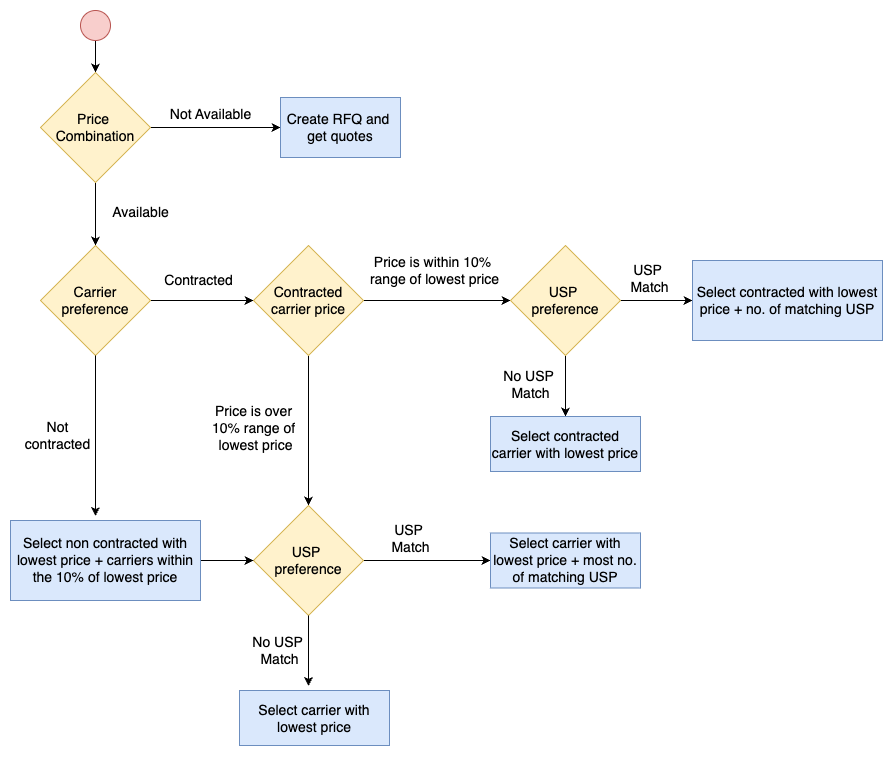
Carrier Selection Process
Authentication
- API Key: X-API-KEY
API key authentication to secure access to the endpoints.
Security Scheme Type: | apiKey |
|---|---|
Header parameter name: | x-api-key |